Indoor Trainer Online Download free

Free during the beta · Mac and Windows

The indoor cycling app for the real Ventoux and Kwaremont.

Indoor Trainer Online is a free indoor cycling app for Mac and Windows that turns your smart trainer into 18 real climbs and routes in 3D, or any route you upload as a GPX file. The resistance follows every gradient, structured workouts control your trainer in ERG mode, and three races a day give you someone to chase.

Free during the beta · No subscription, no credit card · Just your email address

An indoor cycling app that feels like riding outside.

Everything on screen comes from your trainer, your sensors and real map data. Here is what you get.

01 / 07 Ride

Real roads in 3D, with resistance that follows the gradient

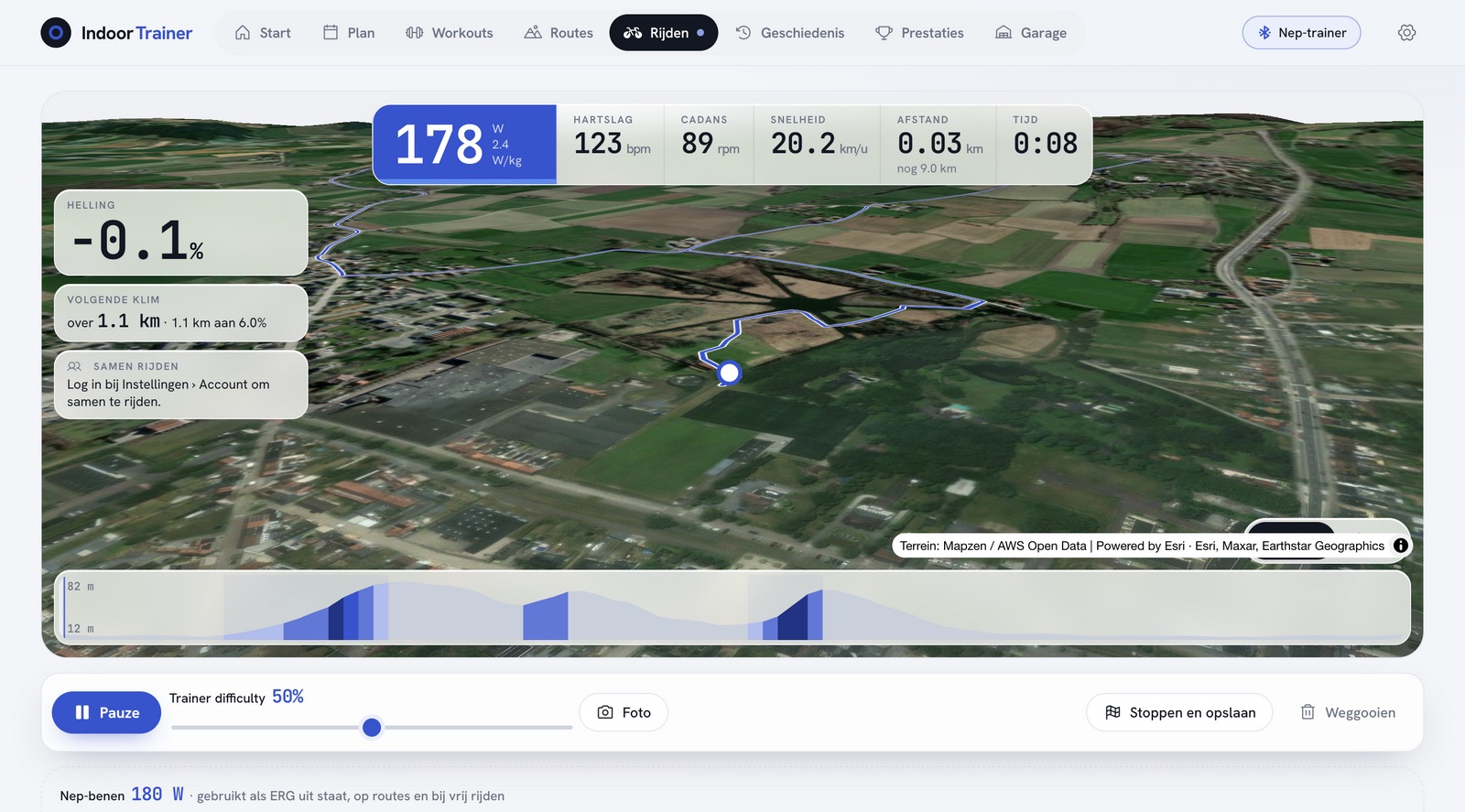
Elevation, road surface and scenery come from real routes and map data. Your speed follows from your power, your weight and the slope, and your smart trainer sets the resistance, so the cobbles of the Paterberg hurt like they should.

  • 3D view or satellite map, switch any time
  • Elevation profile with the next climb ahead
  • Ride against your own ghost on every route
Indoor cycling on the Kwaremont and Paterberg: power, heart rate, cadence and speed at the top, the satellite map and the elevation profile below
02 / 07 Your routes

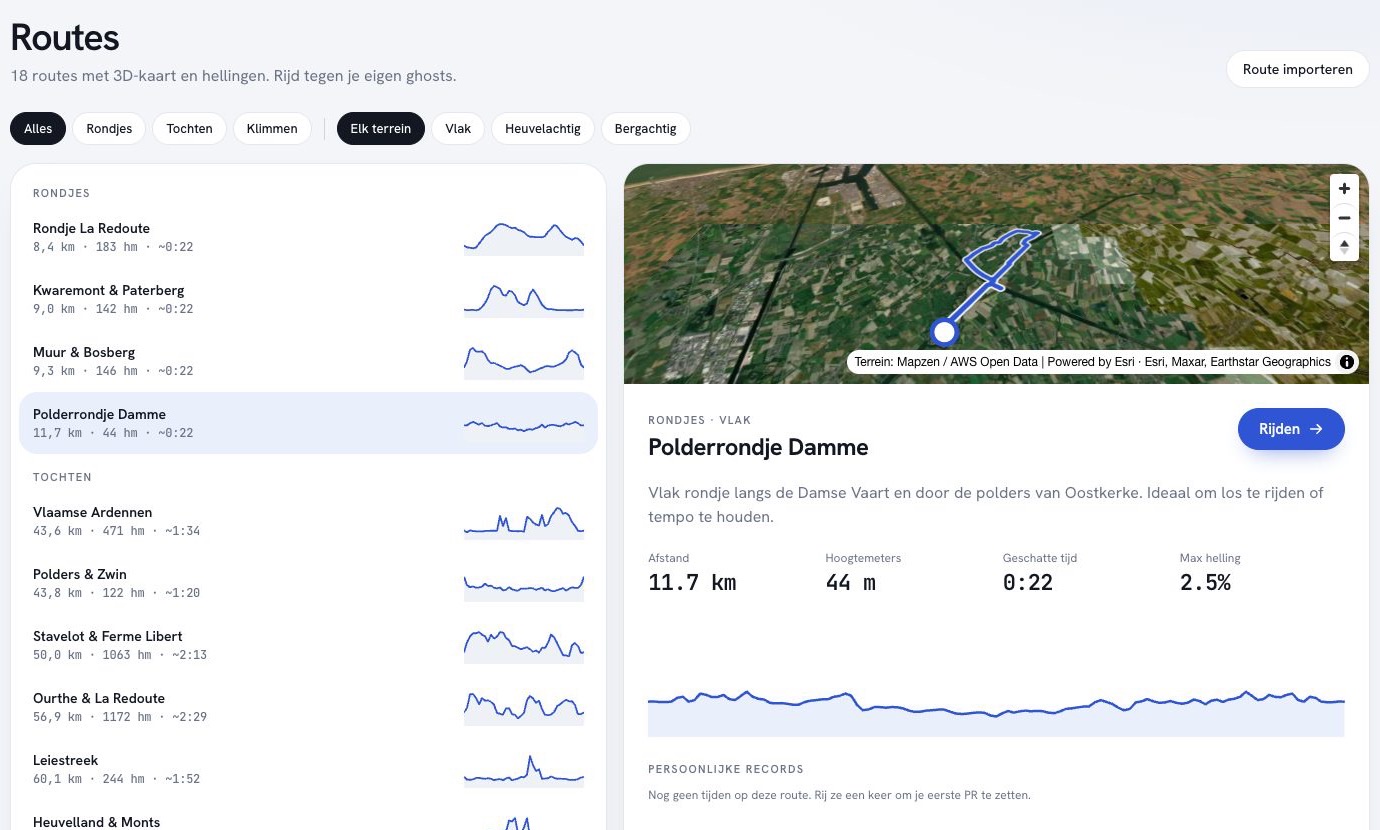
Upload your own GPX and ride it at home

Ride the loop from your club, your next sportive or a mountain from your holiday plans. Import a GPX, TCX or FIT file and the app builds the map, the elevation profile and the resistance from it.

  • GPX, TCX and FIT files with elevation
  • Works with route exports from most route planners and bike computers
  • Your routes sit next to the 18 built-in ones
The route library with the Import route button, a route on the satellite map and its elevation profile
03 / 07 Train

Indoor cycling workouts that steer your trainer in ERG mode

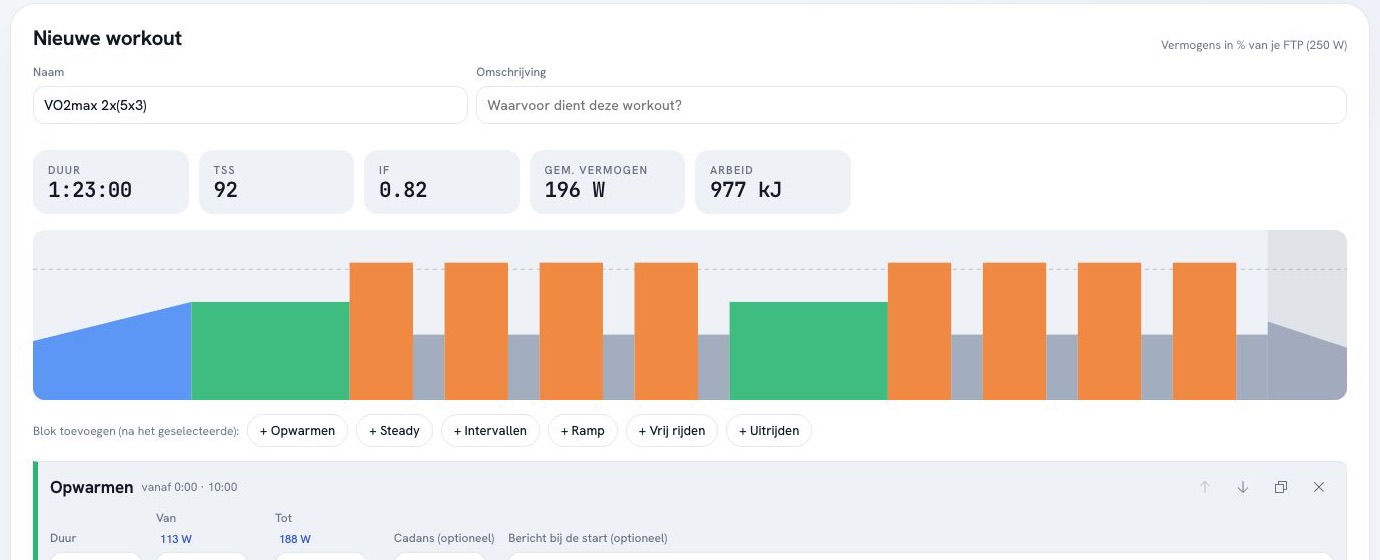
Pick from 90+ workouts sorted by duration and goal, or build your own block by block. In ERG mode the trainer holds the target power, so you only have to pedal.

  • Builder with warm-up, steady, intervals, ramps and cool-down
  • Duration, TSS and average power while you build
  • Import .zwo, .erg, .mrc and .fit workouts
The indoor cycling workout builder with intervals, duration, TSS and average power
04 / 07 Plan

Training plans that fill your calendar

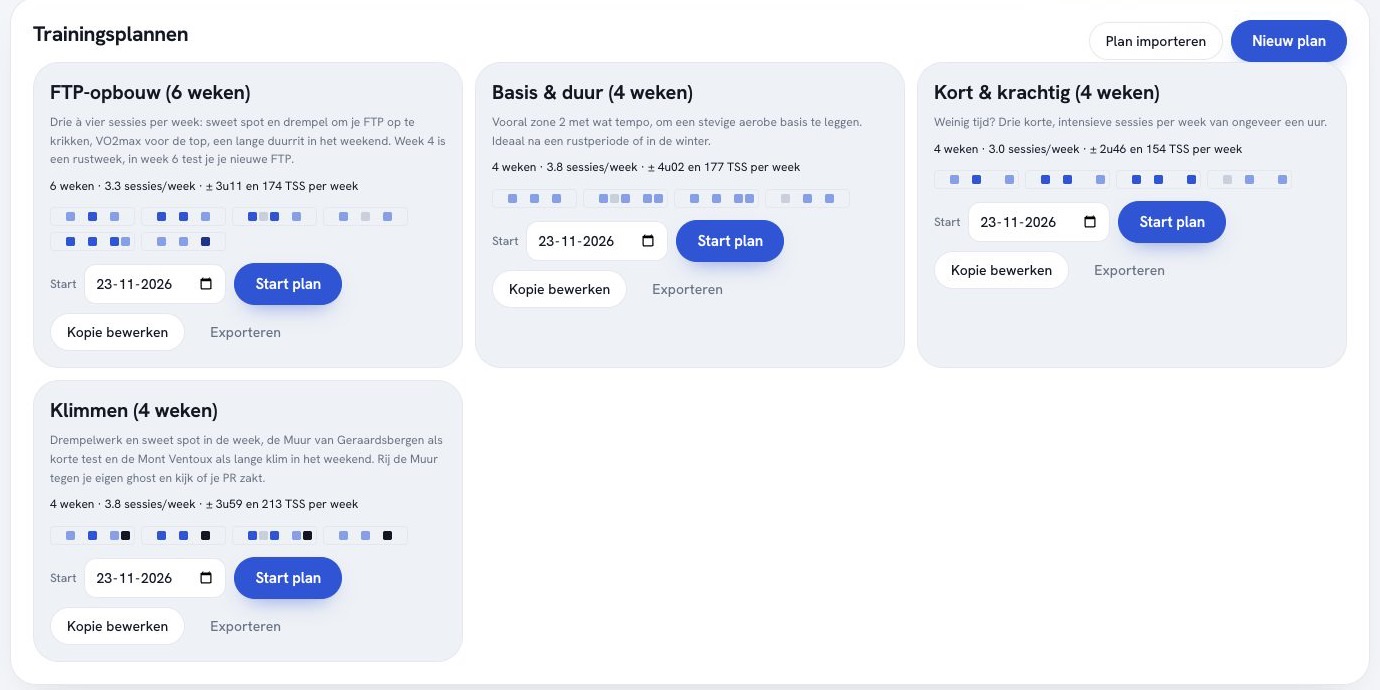
Start a ready-made plan and every session lands in your calendar. Or write your own plan and share it as a file.

  • FTP build (6 weeks), base and endurance, short and strong, climbing
  • Planned and ridden TSS per week
  • Copy and edit any plan, or import one
Training plans: FTP build, base and endurance, short and strong, and climbing, each with a start date
05 / 07 Race

Never ride alone

Ride with whoever is online on the same route, or line up for a race. Everyone starts together, weight and height are fixed for a fair race, and you get a result at the finish.

  • Three races every day
  • A nickname, no chat, and block or report any rider
  • The simulated trainer cannot race
12:30Lunch racea short route from the rotation
19:00Evening racea short route from the rotation
20:30Late racea short route from the rotation

Daily, Belgian time. Same start for everyone, a result at the finish.

06 / 07 Your rider

Make the rider yours, and earn a faster bike

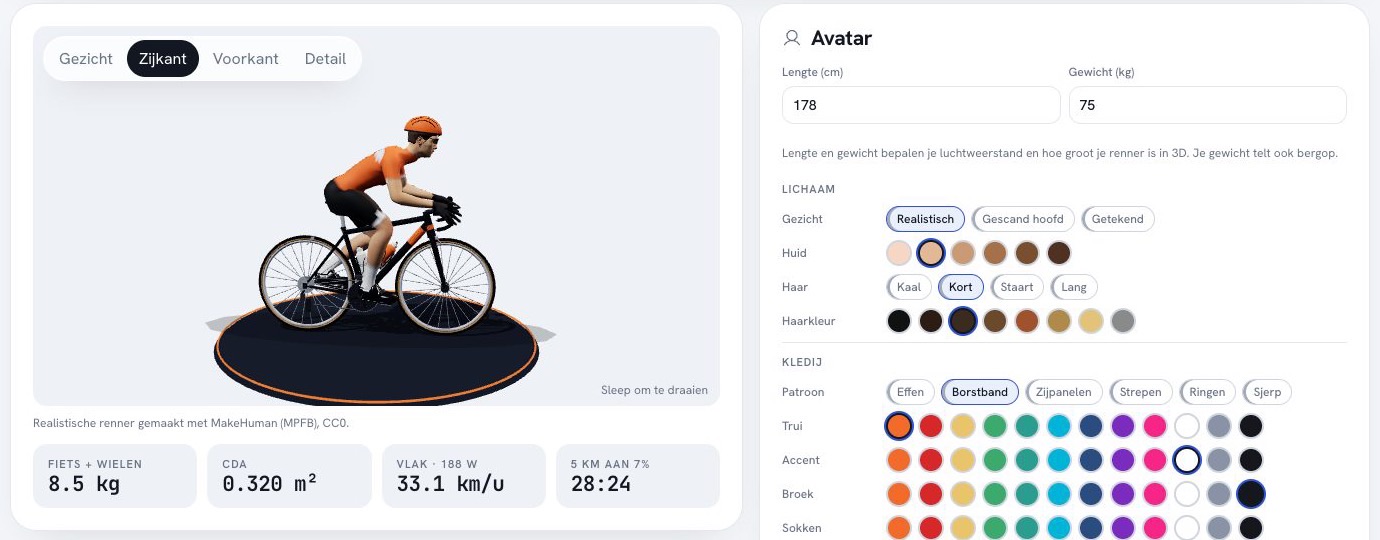
Choose face, hair and kit colours for your 3D rider. Every kilometre and every metre of climbing earns drops, and a lighter or more aero bike makes a real difference on the road.

  • Bike weight and drag count in your speed
  • Your rider and the others shown in 3D
  • Height and weight set how big your rider is
The garage: a 3D rider on a bike with bike weight, drag and speed, and the avatar editor for face, hair and kit colours
07 / 07 Progress

Challenges, badges and your form

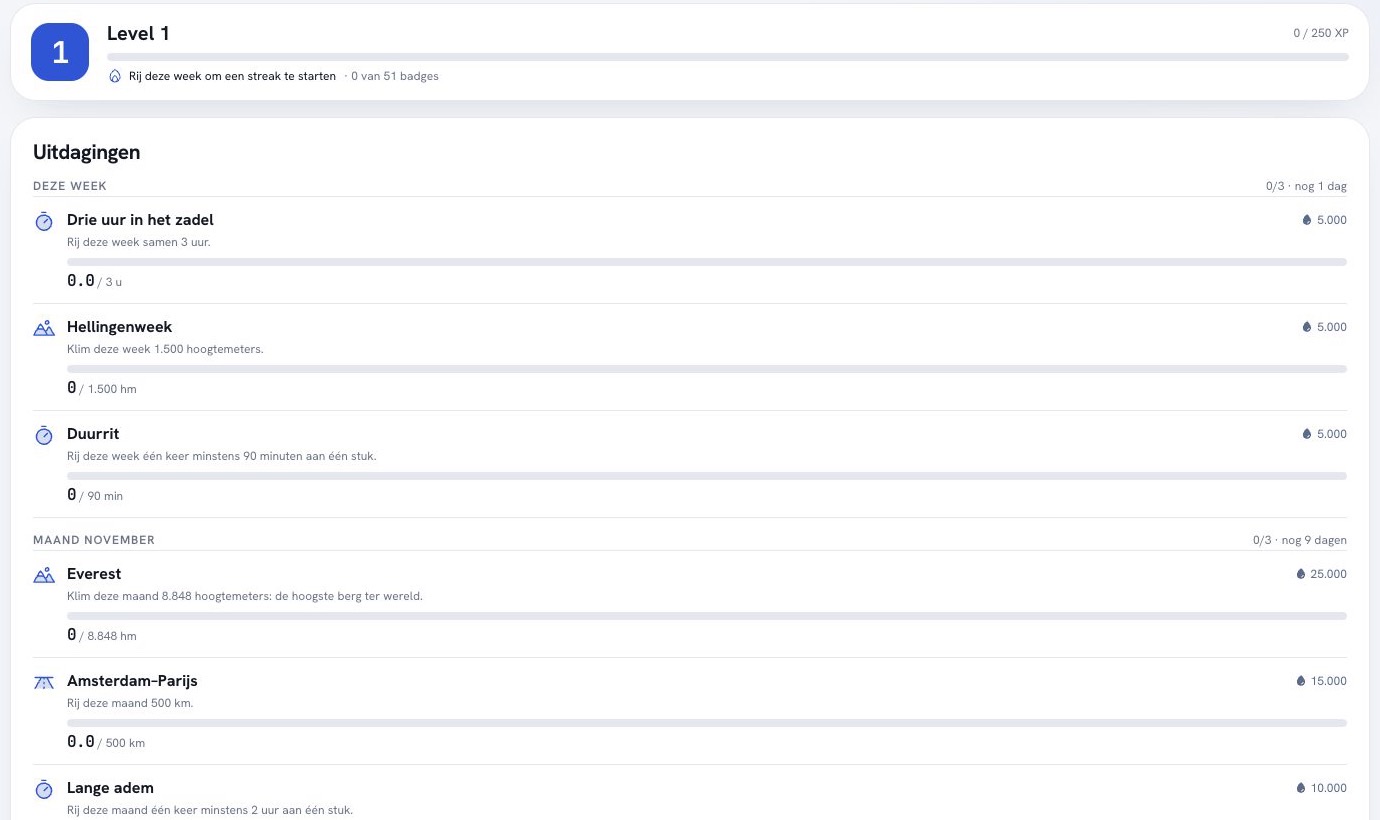
Weekly and monthly challenges give every ride a goal. Fitness and fatigue, a power curve, personal records and a recovery suggestion show whether your training works.

  • Challenges like Everest: 8,848 metres in a month
  • 51 badges and levels to unlock
  • Export every ride as a .fit file
Challenges for this week and this month, with progress towards each goal

Real climbs from the Classics and the Tour.

Every route in the indoor cycling app is built from GPS tracks and OpenStreetMap, with the satellite map and the elevation profile always on screen. Missing your favourite climb? Upload its GPX.

Start indoor cycling in three steps.

From download to your first climb in a few minutes.

  1. 1

    Download the app

    Install the free indoor cycling app on your Mac or Windows PC from the download buttons. It updates itself.

  2. 2

    Pair your smart trainer

    Over Bluetooth, together with your heart rate monitor or power meter. The app remembers your devices.

  3. 3

    Pick a route or workout

    Start riding. Join a race when you want company.

Your rides stay yours.

  • Your rides and stats stay on your own computer, not on our server.
  • No ads, no trackers, and this website sets no cookies.
  • Online you ride under a nickname, with no chat, and you can block or report any rider.
  • Your account is your email address, plus a nickname to ride online. Nothing else.

Questions about the indoor cycling app.

What is an indoor cycling app?

An indoor cycling app connects to your smart trainer and turns a ride at home into a ride on screen. It sets the resistance to match the gradient of a virtual or real route, steers the trainer through structured workouts and records your power, heart rate and cadence, so indoor training feels like riding outside.

Is this indoor cycling app free?

Yes. Indoor Trainer Online is free during the beta: no subscription and no credit card. Every route, workout, training plan and race is included. Download it for Mac or Windows.

Which smart trainers work with it?

Any smart trainer that speaks Bluetooth FTMS (Fitness Machine Service), which covers most trainers sold since 2020; check your manual. Bluetooth heart rate monitors, cadence sensors and power meters work too. ANT+ is not supported.

What do I need on my computer?

Mac: macOS 12 or newer, Apple Silicon or Intel. Windows: Windows 10 or 11, 64-bit. You also need Bluetooth 4.0 or newer, a graphics card that supports WebGL 2 (any computer from the last few years) and an internet connection for the maps and online riding.

Do I need an account?

Yes, a free one. You make it with your email address when you download the app, and log in with a link from your mail, no password. Riding with others also needs a nickname.

Can I ride my own routes?

Yes. Import a GPX, TCX or FIT file with elevation data, for example a route exported from your route planner or bike computer. The app builds the map, the elevation profile and the resistance from it.

Can I try it without a trainer?

Yes. The app has a simulated trainer so you can try every route and workout first. Without a smart trainer the resistance does not change, so for real indoor training you need one.

Can I import my own workouts?

Yes. Import .zwo, .erg and .mrc files, or build your own workouts in the app.

Where are my rides stored?

On your own computer. You can export every ride as a .fit file for Strava, Garmin Connect or TrainingPeaks.

Your next ride starts on the Ventoux.

Free during the beta. Installed in a minute.